
Update (10/29/2020)
Audible books are now available through the children’s profiles on the Fires, so the Audible hacks in this post are no longer necessary. You can now very simply add books from your Audible library to your children’s profiles through the settings in the parental controls. I love that this allows ONLY the audiobooks I select and does not give access to any other part of Audible. This is still the most child safe and friendly way I have found to utilize Audible.
I believe the Rocket Player hack below should still work, but I haven’t tried it lately. We are now using Evernote for storing and playing MP3 files. This works very well, and is so easy to do. I have one family account with a shared log in that all the children can access from their Fires. Post with more details on that coming soon (hopefully!).
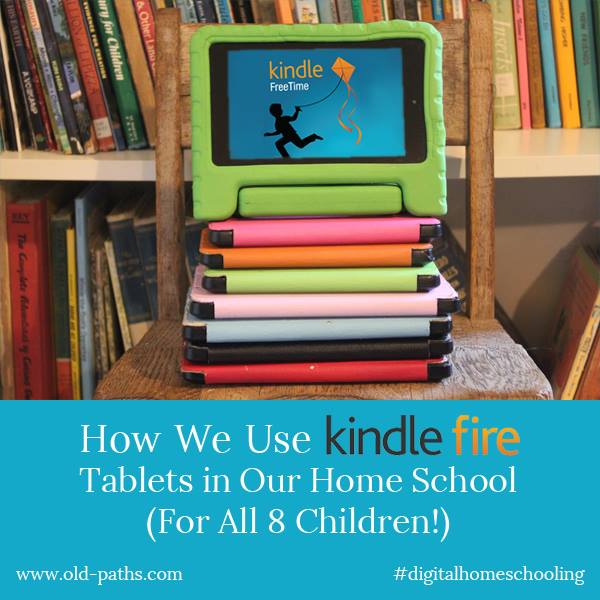
It’s long overdue, but here (finally!) is part two in my series on how we utilize Kindle Fire tablets in our home school. This post will cover one of our favorite uses for the Fires – listening to audio books and music.
Audio books have been an invaluable resource in our home for years. They are a wonderful way to pass the time on car trips, during naptime or while doing chores, and our children listen to them every night as they are going to sleep. They’ve been an especially useful tool in my struggle with chronic illness, since they have enabled the children to listen to excellent literature even when they weren’t yet able to read on their own, and I wasn’t well enough to read to them.
When we originally bought the Fires for the children I thought that audio book and music features came built into Kindle FreeTime (the app that allows the Fires to be turned into child friendly locked down tablets). Much to my disapointment this was not the case so I began a search for some hacks to make this possible. The good news is that I found several options which I am glad to share with you here.
Option One: (Update! This work around is no longer necessary) Use the Built In Audible App on the Parents Profile (Don’t miss an important word of caution on this below.)
We love Audible and have a large and growing audio book library there, so we came up with a work around which allowed the children to listen on the Audible app within the parent’s profile on their tablets (keep reading for a crucial caveat).
In the parent’s profile create a PIN number to switch from the child’s Free Time profile to the locked down parent’s profile. This locks your child out of the entire parent’s profile. Then, within the parent’s profile, set up parental controls and lock down everything (including the Audible store) except for the Audible app. When the children want to listen to an audio book have them bring you the tablet to put in the PIN and turn on the book.
However! If you go this route there is another important step you need to add. Recently, Audible introduced channels (similar to podcasts), some of which contain pornographic content and are not able to be blocked by parental controls. I’m hopeful that they will correct this, but for now here is a simple hack to make the app usable for children (but use this with caution):
Follow the steps listed above to set up the Audible app in a PIN protected parent’s profile. Once this is set up, turn on the audio book. Then, close the screen by clicking the power button on the Fire. Click again to turn the screen back on. This won’t turn off the audio book, it just locks the child out of the parent’s profile. DON’T miss this step, and be sure the child is really locked out, since this is vital for keeping the problematic channels out of the children’s reach. Once the screen is turned back on the child can swipe down from the top to pause, rewind or close the audio book without access to anything else.
I would also encourage you to contact Amazon and Audible and request that they make it possible to totally block channels with parental controls.
Currently, the main way we listen to our Audible library is via our Amazon Echo, but I’m thankful for this occasional work around on the tablets.
Option Two: Install an MP3 Player App
While the Audible hack has worked well for us, there was still no way child friendly way to listen to music on the Fires. We also have a large MP3 audio book library that I wanted to be able to load onto the tablets.
It took me a bit of research to find a solution, but it ended up being extremely simple and will turn your Kindle Fire into a high quality MP3 player with the ability to create playlists (à la iTunes). Even better, this can all be accessed right within FreeTime with no need for extra steps and passwords. This will also work – with a little time and effort – as another, even safer, option for listening to your Audible library.
First, go to Amazon and download both the Rocket Player and Rocket Player Premium Unlocker apps. There is a small charge for the latter, but I highly recommend buying that since this will keep ads (which might not be child friendly) off the app and will also enable it to play more types of audio files.
Once you have both apps installed on your child’s tablet, connect the tablet to your computer via the USB cable. This will enable you to transfer MP3 files from your computer to your child’s tablet. (Note: As much as I would love to have a Mac eventually, my current laptop is a PC and so the following instructions are for my fellow Windows users. I’m guessing the steps would be similar for Mac users).
Click on your computer’s control panel, then choose “Computer”. You should see the Fire icon here.
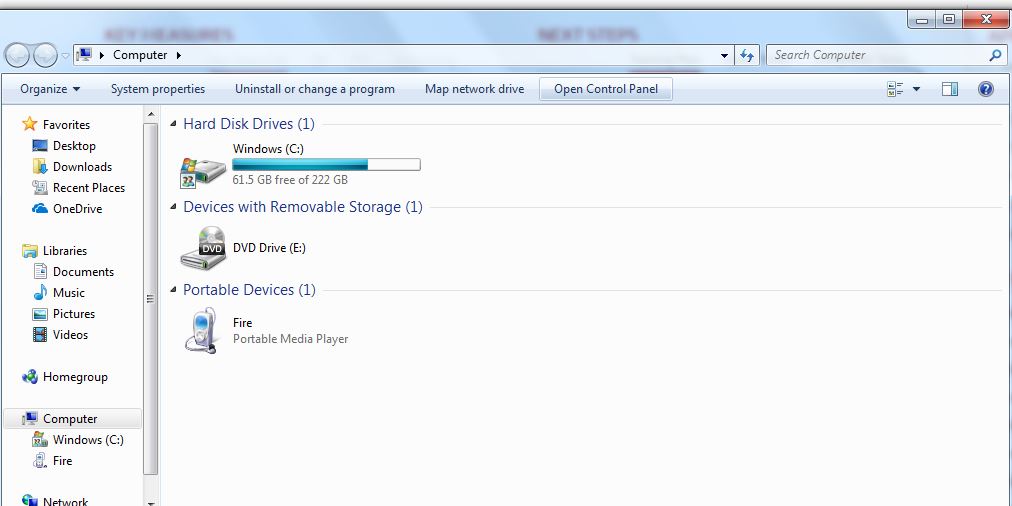
Double click on the icon, then double click on “Internal Storage”. This is where you will be able to see and access the files on your child’s tablet.
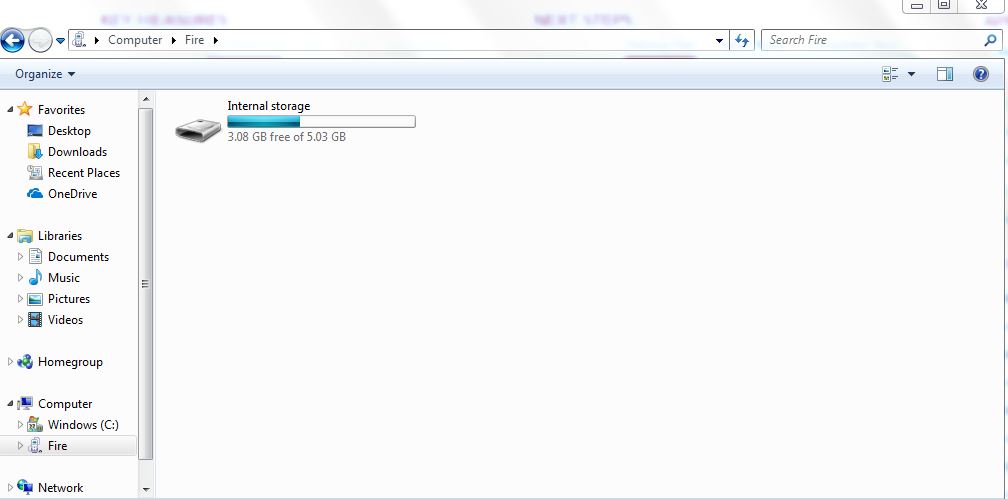
Double click on that to bring up all the folders on your child’s tablet.
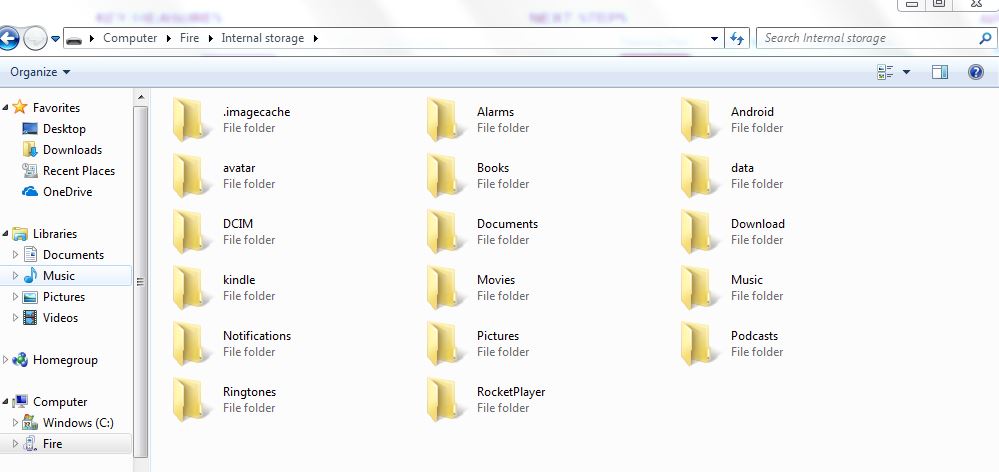
Now, find the MP3 files on your computer that you want to load onto your child’s Fire and copy them and paste them into the “Music” folder here. (Don’t put them in the Rocket Player folder, although it seems like the natural spot to save them.) Just repeat the process to add more files. When you are done, unplug your child’s tablet from your computer and the files should all sync and show up in Rocket Player. Voila!
There are several ways to obtain audio books and music in the MP3 format.
1. Download MP3 Files Directly to Your Computer
This is the easiest option since the files are ready to go as is. Once they are on your computer, just use the copy and paste method above to transfer them to your child’s tablet. Here are some of my favorite resources for MP3 ready files.
- Librivox.org has a huge selection of free children’s audiobooks, just be aware that some readers are better than others. Read Aloud Revival has complied a helpful list of some of the best.
- Kara Shallenberg, one of our favorite Librivox readers, also has more titles on her own website KayRay Reads to You.
- My Audio School also has a nice collection.
- Jim Hodges Audio Books is not free, but is another great resource that includes books by G.A. Henty, R.M. Ballantyne, and one of our favorites, Stories of the Pilgrims. Highly Recommended. Update! (10/29/2020) Many of the books read by Jim Hodges books are currently available on Audible, and several are included in an Audible Plus membership for no extra charge.
- Several products from Classical Academic Press come with MP3 files which lend themselves perfectly to this use. They also have this classic story available: The Story of a Bad Boy
- Amazon offers an Mp3 option for their music downloads and has a huge selection.
- Amazon also has a large selection of audio books by Jim Weiss in the MP3 format. Good selection of classics here.
- This Scripture songs CD by Kelly Crawford is one of my favorites and comes with an MP3 option.
- Songs for Saplings Some of my all time favorite children’s music.
- Judy Rogers Music Another favorite.
2. Rip Your Own Purchased CDs Onto Your Computer and Create Your Own Files
This is an option I have utilized quite a bit. Normally, I much prefer purchasing digital audio files since then I don’t have to worry about CDs getting lost or scratched. However, there are benefits to owning CDs; with this route you get the best of both worlds and your options for building an MP3 library are almost limitless. Just rip the CD onto your computer and you will end up with both your hard copy CD and a digital version. This gives the added benefit of having a back up copy of your CD in the (highly likely in our house) event that it gets damaged or lost. I did this with most of our CD collection for both music and audio books and have loved having many beloved stories and songs in a handy digital format. Ripping CDs via Windows Media Player gives you the option to turn your files into either MP3s or the WMA format, which also works within Rocket Player Premium. Here’s an article on how to do this.
I’m planning to go back to using this option more now that we can’t use Audible on the tablets, since many Audible selections are also available on CD. It’s a bit more work up front, but the benefit is that the children can play these files right in Kindle FreeTime
3. Import Your iTunes Library into Rocket Player
For this option you will need to download the ISyncr app to your child’s tablet and the software to your computer. This will allow you to convert and import your iTunes library into Rocket Player on your child’s tablet. I have some of our Audible library downloaded into iTunes, so was hopeful this would also convert the Audible files to MP3, but it didn’t. The Audible files would not convert. However! There is a 4th option that does work for this.
4. Turn Your Audible Files into MP3 Files Update! No Longer Necessary.
You will first need to download your Audible files to your computer. You can find instructions for getting set up with that here. Once that is done you will need to download this software onto your computer. This short video will give you the step by step instructions for that: EASIEST Way to Convert Audible.com AA and AAX Files to MP3 Free I tested this out and it worked perfectly. This is probably the most time consuming way to access your Audible library and create MP3 files but is worth it if you would like to still be able to utilize your Audible audiobooks within FreeTime. Audible does have an excellent selection of children’s classics, the recordings are high quality and the prices are good (sometimes even only a dollar or two.) so it might be worth the hassle of some extra steps. Also, once the initial set up is done it should be pretty simple to keep up with.
Listen via Kindle Books Text-to-Speech
There’s yet another way to listen to audio books within FreeTime, though it’s not my first choice. On the Kindle Fires, there is an option on some Kindle ebooks for text-to-speech. This works in a pinch, but it’s a computer generated voice that doesn’t always pronounce words correctly.
I hope this has been helpful! I love this use of Kindle Fires for our children that creates an educational tool that is utilized multiple times daily.
What are some of your favorite audio resources? Have you found any other hacks to better utilize your Fire tablets? I’d love to hear from you in the comments.
Hi Jen, I was just re-reading your articles as we prepare to start a new homeschool year and I was wondering if you’re planning to continue the series with the apps you use and some of the other details on how you use the Fires in your homeschool. I really enjoy your insights!
Hi! Yes, I am still planning to! I’ve had to push the series and blog to the back burner of life for now, but looking forward to getting back to it hopefully soon. 🙂
Wow! Your post is so crazy helpful. My kids are getting kindles for Christmas and I fully intend on using your suggestions to set them up ahead of time. I’d love to hear more about apps you use for writing or play and things like that. Thanks for an awesome article!
Thanks for the kind words! I did want to let you know that I’m no longer recommending Kindle Fires for children since Amazon has tweaked things recently to make them barely useable unless you subscribe to FreeTime Unlimited. It’s been really frustrating and we are planning to switch over to Ipad Minis (this year’s Christmas presents!). On Ebay they are selling refurbished Minis for around $110 – $170. The Fires end up costing around 100.00 by the time we pay to take the adds off, buy a storage card and buy a warrenty, so the refurbished Mini’s don’t cost a ton more. I plan to do a post on those once we get them and have them all set up. The built in parental controls look quite good.
We just bought kindle fires on sale… could you elaborate on your comment regarding Amazon making the kindle hard to use without unlimited… I just turned the FREE unlimited off in the settings… we have a lot of music iTunes and Jonathan park episodes that I would love for my kids to be able to listen to… did they shut down your work arounds! Thank you!!!!
Hi! I’m glad you asked, since I was meaning to come back and comment with an update about the Fires. A couple months ago Amazon sent out an update that had Kindle Freetime not working very well at all for weeks. However, just the other day I did a factory reset on a few of the children’s Fires and they are working great again! So everything I mentioned in this bog post should still be current. I just reloaded my 7 year old’s Fire with MP3 files and Rocket Player is still working perfectly to play those. If you run into any snags let me know; I might have an answer or work around for them. 🙂
Hope that helps!
How do you access the audio files under each child’s accounts? I have rocket player installed on the adult and childs account but can only see the files on the adult account.
Hmm, all I can think of is that the files need to be in the Fire’s “Music” folder and not the “Rocket Player” folder.
I talked to Amazon and they said the mp3 files would only be on the parents login that the tablet is registered under.
Am I missing something or did they change how it works.
I have them stored in the music folder.
Hmm, trying to think what the issue might be. I just reloaded my 7 year old’s Fire with MP3 files the other day using the method I talk about in the post and it worked perfectly. Hmm. Maybe try taking Rocket Player off the parent’s profile and only having it on the child’s profile?
Wonderful post!! We have been using Kindle Fires for several years, compliments of grandparents, with FreeTime Unlimited. Two of my biggest complaints have recently been addressed by Amazon (not bc of me – must’ve been other parents who felt the same!).
1) The awful content that comes with FreeTime.
Within the child’s profile settings, parents can now EXCLUDE the free stuff they don’t want their kids seeing. For example, I don’t want my 6 year old reading about witches and zombies. I can enter in the key word “zombies” and select all the related books, apps, and videos to be excluded. Time consuming, but oh so worth it!! Need to review every 3 or 4 months for new content added. (We’ve pretty much eliminated videos…all junk and very little of the good stuff otherwise seen on Amazon Prime. Sad.)
2) Audible Books!
Purchase or download Audible books within parental account, switch to child’s account, and within settings, choose Audible books to add to child’s account. The kids can then find them under the Book heading. Also, under the time constraints setting, Audible books have their own category. For example, parents can set regular book time for 30 minutes and Audible book time for an hour. Unfortunately, at this time (Spring 2018), there is not a way to choose Audio books within kid’s profile like they can choose books, apps, and videos. But I’ve heard there are 300 Audible Books now available with FreeTime, but we haven’t figured out how to access them.
Thank you for the awesome advice on getting music!! That’s been high on my kids’ wish list. More so than videos.
We have installed Youtube Kids, Rocket Player and some other Google Play Store apps that we’d previously purchased by installing the google play store in the Freetime Profile and using GoToApp to place a link to the items we want to allow.
https://www.techjunkie.com/youtube-for-kids-kindle-fire/
Thought I’d share. I ran across your blog looking for instructions on how to load some mp3s onto her Kindle so she could listen along with a reading program we have. Our Kindles are whatever version they were selling last fall (November 2018).